


Sparkling Bar
Dreame Refrigerator-FizzFresh cross door
Dreame Refrigerator-FizzFresh cross door
Regular price
Regular price
Sale price
$0.00
Unit price
per
Couldn't load pickup availability
- Free New Zealand Post eParcel Shipping on purchases over $100.00
- Orders are dispatched within 24 hours from Auckland, New Zealand.
- Local Manufacturer's Warranty and Lifetime Support. Learn More
- Up to 30-day refund/return policy. Learn More
*Exceptions for weekends and public holidays.


- Description
- Video
- Specifications


Fast & Even
Cooling
Cooling


FreshFlex Multi-Mode Zone
FreshFlex
Multi-Mode Zone
Multi-Mode Zone


Connected
Intelligence
Intelligence


Exclusive
MatteSilk Finish
MatteSilk Finish


IceDUO
Auto Ice Maker
Auto Ice Maker
Sparkling Bar
Fast & Even
Cooling
Cooling
FreshFlex Multi-Mode Zone
FreshFlex
Multi-Mode Zone
Multi-Mode Zone
Connected
Intelligence
Intelligence
Exclusive
MatteSilk Finish
MatteSilk Finish
IceDUO
Auto Ice Maker
Auto Ice Maker
Video


Description
Choose Your Perfect Fizz - 3 Carbonation Levels
- Light
- Classic
- Bold
-

Light
For sensitive palates, subtle mixers, or a mild everyday sparkle.
-

Classic
Refreshing and versatile, perfect for drinking, dining, or classic cocktails.
-

Bold
Maximum effervescence with an intense burst—ideal on its own or for bold-flavored drinks.


Less Plastic. More Sense.
A simple way to reduce waste and rethink everyday hydration.

10950
1
5110
€2
Less Plastic. More Sense.
By choosing this fridge, you make a sustainable investment. For example, a family of three can avoid approximately 10,950* plastic bottles over 10 years and save around €5,110*. With SparklingBar, you're not just choosing smarter hydration—you're embracing a cleaner future.By choosing this fridge, you make a sustainable investment. For example, a family of three can avoid approximately 10,950* plastic bottles over 10 years and save around €5,110*. With SparklingBar, you're not just choosing smarter hydration—you're embracing a cleaner future.
Over 10 years, a family of three could replace around 10,950¹ plastic bottles¹ by using SparklingBar — while saving up to 5,110 €². A simple way to reduce waste and rethink everyday hydration.
Engineered for the Perfect Sip - The FizzFresh™ Intelligence
Through thousands of tests, Dreame's engineers perfected the ideal balance of temperature and pressure for optimal carbonation . The smart control system continuously monitors and adjusts in real time—delivering crisp , consistent bubbles from SparklingBar , every pour.


Engineered for the Perfect Sip -The FizzFresh™ Intelligence
Through thousands of tests, Dreame's engineers perfected the ideal balance of temperature and pressure for optimal carbonation. The smart control system continuously monitors and adjusts in real time—delivering crisp, consistent bubbles from SparklingBar, every pour.
Effortless Refills, Smart & Simple
Never run out of fizz. Smart system keeps you ready.
Video

Description
-

Smart Alerts
Display light + app notification when CO₂ runs low.
-

One-Click Reorder
Order refills directly in the Dreamehome App.
-

Universal & Easy
Works with standard screw-in cylinders, hassle-free installation and replacement.


-

Cube Ice
Chills drinks without over-diluting; ideal for whiskey on the rocks and longer parties.
-

Crunch Ice
Cools instantly; perfect for smoothies, iced coffee, and blended cocktails.


Premium Aesthetic Silken Touch
Our exclusive MatteSilk finish elevates stainless steel. It delivers a profound matte elegance to the eye and a remarkably soft, smooth, silk-like feel to the touch, surpassing standard stainless steel in every detail.


Remote
Control
Control

Smart
Alerts
Alerts

CO₂ Cylinder
Reorder
Reorder

Storage
Recommendations
Recommendations

Quick Customer
Support
Support

From Smart Features to Preserved Freshness
FreshFlex Multi-Mode Zone
The FreshFlex drawer features three precision mode settings to perfectly preserve everything from delicate berries to premium cuts of meat.
Video

Description


Soft freeze mode

Dairy and beverages

Fruits and vegetables

Fast & Even Cooling
Metal Air Duct – Enables rapid cooling to quickly reach the desired temperature.
Full-Coverage Airflow – Guarantees uniform temperature distribution in every corner of the refrigerator.
Video

Description

AeroFresh
Purification
It incorporates an activated carbon module to actively neutralize food odors. By continuously filtering circulating air, it maintains a neutral environment that helps preserve food freshness longer.

Deep Beverage Rack
The extra-deep beverage rack is engineered for massive storage, holding two rows of bottles to maximize your space.


Inverter Compressor
The inverter compressor intelligently adjusts its power for superior efficiency and energy savings. It maintains precise, stable temperatures to optimize food preservation while operating at minimal noise for a quieter home.

Superior
Efficiency

Quiet
Operation

Stable
Temperature

Organized Freezer
203L of freezer space with multiple dedicated zones, keeping your pizza, ice cream, and meats organized, separated, and easy to find.
Frequently asked questions
Q1: What is the proper way to position the refrigerator after delivery to ensure optimal performance?
To ensure optimal performance and energy efficiency of your refrigerator, we recommend:
Adequate Ventilation Space: Maintain at least 10 cm of clearance at the back and at least 10 cm on both sides to ensure proper airflow, enhance cooling efficiency, and extend the appliance's lifespan.
Suitable Environment: Place the refrigerator away from heat sources (such as stoves, heaters, or direct sunlight) and humid areas, ensuring it rests on a level and stable surface.
Initial Use: After delivery, allow the refrigerator to stand unpowered for 2–4 hours to stabilize the cooling system. For best results, let it run empty for 2–3 hours before loading food.
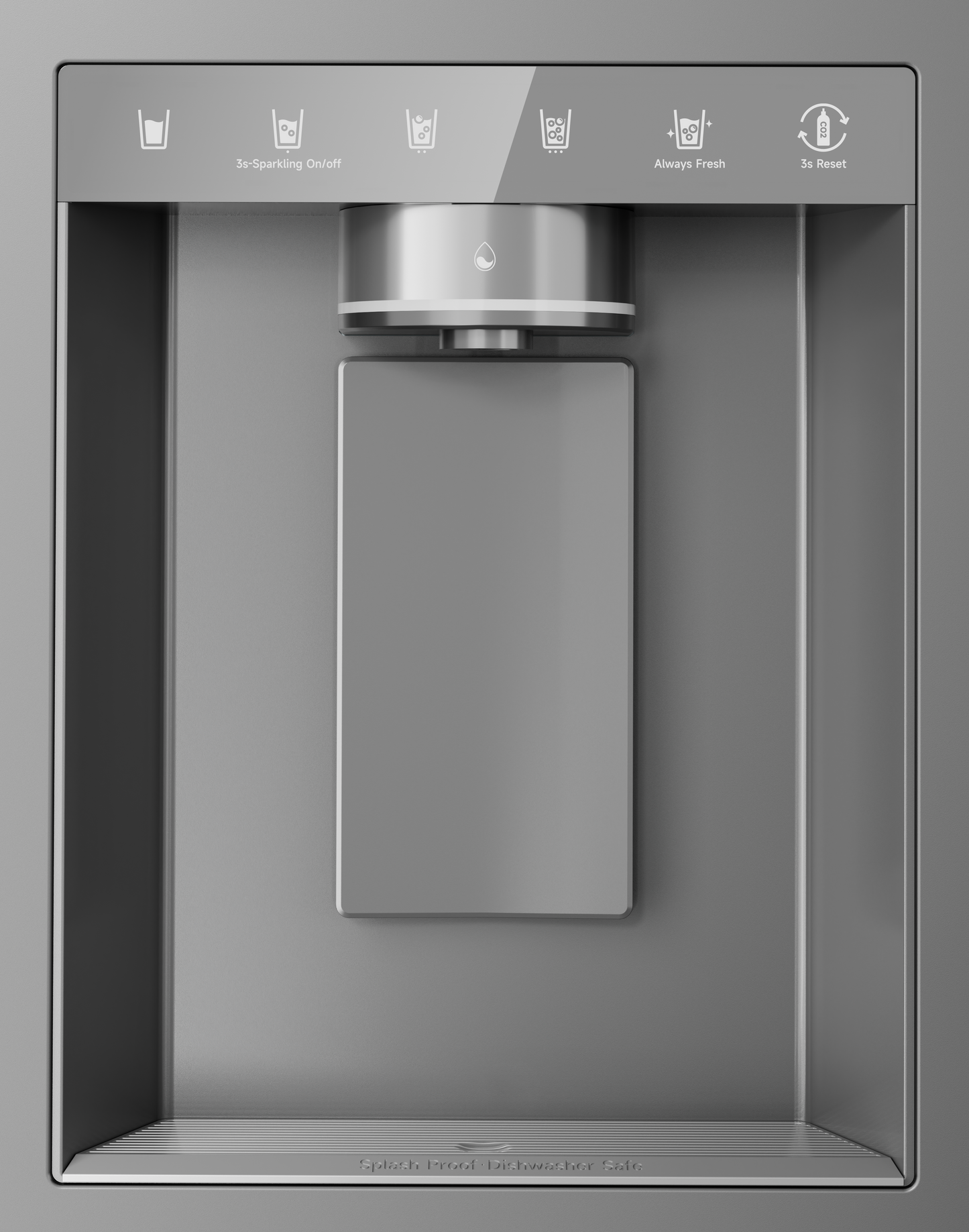
Q2: How to use the sparkling water function?
After powering on, the system defaults to Still Water mode, and the still water indicator illuminates.
Press and hold the "Sparkling On/Off" button for 3 seconds to activate the sparkling water function. Then select your desired bubble level:
Level 1 Button – Light bubbles
Level 2 Button – Classic bubbles
Level 3 Button – Bold bubbles
Once a mode is selected, the sparkling water production cycle begins and takes approximately 1 minute to complete. Each cycle produces 600 ml of sparkling water.
Please note: The bubble level cannot be changed until the current cycle is finished.
"Always Fresh" Button
With the Always Fresh function activated, the refrigerator automatically carbonates the water every 4 hours during the user-specified time frame. This ensures the sparkling water stays fresh, preserves its optimal flavor, and minimizes the risk of bitterness or loss of carbonation over time.
The user can configure the start and end times via the app, enabling the system to operate automatically during the selected time frame and deliver consistently high-quality sparkling water without requiring manual intervention.
"3s Reset" Button
When the CO₂ cylinder is running low, the indicator light flashes. After replacing the CO₂ cylinder, press and hold this button for 3 seconds until the indicator turns off, indicating that the reset is successful.
Q3: How to use the ice making function?
The ice maker and ice storage compartment are located in the upper section of the freezer. When using the ice maker, ensure the ice maker switch is turned on and the water system is properly connected.
The ice making function is OFF by default upon power-up. Touch "Cube Ice" or "Crunch Ice" button to activate the ice maker. The indicator will light up and ice production will begin. Touch button again to disable the function.
Ice production operates continuously in cycles. Once the ice storage bin is full, the ice-making process will automatically stop.
Q4: How to set the FreshFlex Multi-Mode Zone?
Press the FRESH FLEX button to adjust the temperature of the FreshFlex Multi-Mode Zone.
Power-on default "Fruit & Vegetable" mode, single tap to switch modes:
· Soft Freeze Mode: The flex temperature drawerwill operate at -3~-1°C
· Beverage Mode: The flex temperature drawerwill operate at -1~1°C
· Fruit & Vegetable Mode: The flex temperaturedrawer will operate at 2~4°C
Q5: How to Connect the Refrigerator to Wi-Fi
(1) Network Configuration Settings
Unlock the control panel: Press and hold the "3s Unlock" button for more than 3 seconds until you hear a beep.
Enter Wi-Fi mode: Press and hold the "3s Wi-Fi" button for more than 3 seconds until you hear a beep and the Wi-Fi icon starts flashing.
(2) Device Binding
Connect your phone to a 2.4GHz Wi-Fi network.
Open the DREAME app and follow the on-screen prompts to add and bind your device.
Once successfully bound, the refrigerator will appear in the app's device list, and you can control it remotely.
Q6: How should I clean and maintain the refrigerator?
Exterior Cleaning: Gently wipe the door and handles with a soft damp cloth and neutral detergent, then dry with a clean cloth.
Interior Cleaning: We recommend periodic cleaning with the power off. Remove all food items and wipe the interior walls, shelves, and drawers with a soft cloth. The refrigerator features an antibacterial interior and an easy-to-clean design for effortless maintenance.
Control Panel- External Display

Control Panel - Internal Display

Measurements


Spec Comparison

|

|
|
|---|---|---|
| Model Name | DRC560WMXEEUP | DRF560WMXEEUP |
| Dimensions (W*D*H) | 911 x 693 x 1830 mm | 911 x 693 x 1830 mm |
| Total Net Capacity | 524 L | 524 L |
| Capacity Cooling | 308 L | 308 L |
| Freezer Capacity | 203 L | 203 L |
| FLEX Capacity | 13 L | 13 L |
| Energy Class | E | E |
| Ice Making Capacity | 2.5 kg / 24 h | 2.5 kg / 24 h |
| Colour | MatteSilk Inox | MatteSilk Inox |
| Item Weight | 109 kg | 113 kg |
| Annual Energy Consumption | 321 kWh Per Year | 321 kWh Per Year |
| Noise Level | 38 Decibels | 38 Decibels |
| Compressor Warranty | 20 Years | 20 Years |
| Installation Type | Freestanding | Freestanding |
| Defrost System | Automatic | Automatic |
| Climate Class | T, ST, N, SN | T, ST, N, SN |
| Freezing Capacity | 12 kg / 24 h | 12 kg / 24 h |
| Power-off Holding Time | 9 Hours | 9 Hours |
Spec Comparison
|
|
|
|---|---|
| Model Name DRC560WMXEEUP | DRF560WMXEEUP |
| Dimensions (W*D*H) 911 x 693 x 1830 mm | 911 x 693 x 1830 mm |
| Total Net Capacity 524 L | 524 L |
| Capacity Cooling 308 L | 308 L |
| Freezer Capacity 203 L | 203 L |
| FLEX Capacity 13 L | 13 L |
| Energy Class E | E |
| Ice Making Capacity 2.5 kg / 24 h | 2.5 kg / 24 h |
| Colour MatteSilk Inox | MatteSilk Inox |
| Item Weight 109 kg | 113 kg |
| Annual Energy Consumption 321 kWh Per Year | 321 kWh Per Year |
| Noise Level 38 Decibels | 38 Decibels |
| Compressor Warranty 20 Years | 20 Years |
| Installation Type Freestanding | Freestanding |
| Defrost System Automatic | Automatic |
| Climate Class T, ST, N, SN | T, ST, N, SN |
| Freezing Capacity 12 kg / 24 h | 12 kg / 24 h |
| Power-off Holding Time 9 Hours | 9 Hours |
Product List
| Product Name | Model Name | Launch Date | End date of security update support |
|---|---|---|---|
| Refrigerator-Freezer | DRC524WSMS4AU | 2026-07-30 | 2030-07-30 |
| Refrigerator-Freezer | DRF524WSMS4AU | 2026-07-30 | 2030-07-30 |
Software List
| Software Name | Launch Date | End date of security update support |
|---|---|---|
| DREAME APP | 2026-07-30 | 2036-07-30 |
Disclaimer
- Based on standard consumption (1L/person/day for a 3-member household)
- Based on bottled sparkling water at € 0.80/L (after deducting gas cylinder costs)
Security Vulnerability Disclosure